


By Alvin Alexander. Last updated: June 4, 2016
Checking out a copy of a project
Select "Create | Checkout Module", then fill in these fields:
-
Enter the module name and path on the server -
Local folder to checkout to
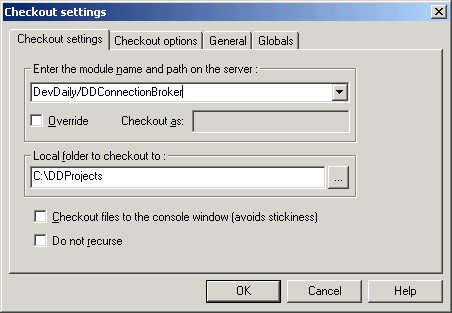
In the example above I am checking out a project named DDConnectionBroker that resides inside of another CVS project directory named DevDaily. The resulting files (my sandbox) will be placed in a directory on my PC named C:\DDProjects.
I could have just checked out the name DevDaily, but that command would grab every directory inside of DevDaily and downloaded all of them, and that's not what I wanted here -- I just wanted the DDConnectionBroker project.
Notes:
- You may be prompted for your password if you haven't already logged in.
-
Under certain versions of Windows you may need to hit
[F5]to refresh your WinCVS display.
With a few button clicks to open the folders, your WinCVS window will look like this:
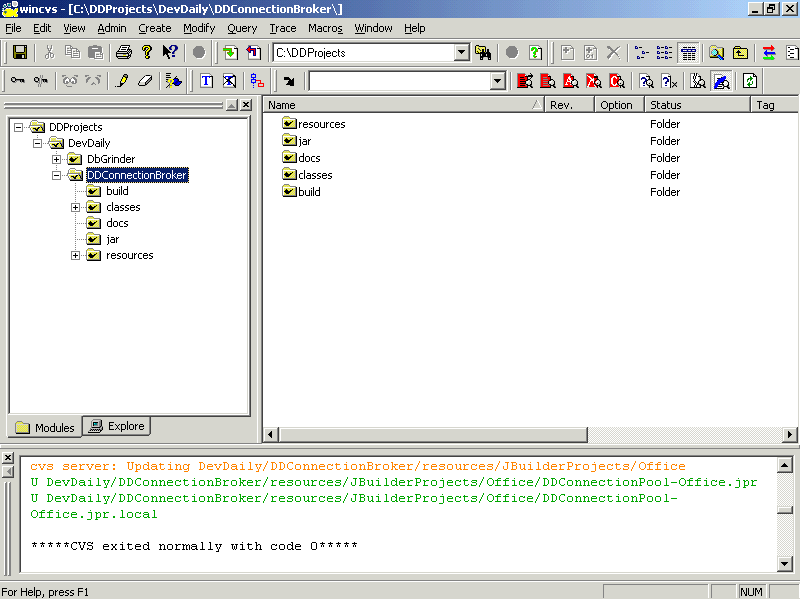
Congratulations! You have checked out the project and you're now ready to start working with it.
books by alvin
 |
 |
 |
 |

